---
title: "Terminal features"
description: "Images, hyperlinks, clipboard, native progress, terminal palettes, mouse input, and screen modes in tuika."
image: "https://tuika.dev/social-card.png"
---
> Documentation Index
> Fetch the complete documentation index at: https://tuika.dev/llms.txt
> Use this file to discover all available pages before exploring further.
# Terminal features
Cross-cutting terminal capabilities that sit outside the [component
gallery](/components/): the *out-of-band* escape sequences tuika speaks to the
terminal itself — clickable links, native progress, the system clipboard — and
the mouse model that turns pointer input into selections and clicks.
These are terminal features, not widgets. Where a component paints cells,
several of these emit an OSC (Operating System Command) sequence the terminal
interprets directly. That has one consequence worth stating up front: a
terminal that understands the sequence acts on it; one that does not silently
ignores the unknown OSC, so the feature degrades to plain text or a no-op
rather than leaking escape codes onto the screen.
## Capabilities
`Capabilities` is the one place to ask what the terminal can do —
`graphics` (an `ImageSupport`, the Images section below), `hyperlinks`,
`clipboard`, `progress`, and `truecolor`.
[API](https://docs.rs/tuika/latest/tuika/term/capabilities/index.html)
```rust
use tuika::term::capabilities::Capabilities;
let caps = Capabilities::from_env(); // instant, no terminal I/O
if caps.supports_images() { /* … */ }
```
Two tiers. `Capabilities::from_env()` is an **advisory** guess from `TERM`,
`TERM_PROGRAM`, `COLORTERM`, `KITTY_WINDOW_ID`, and the Ghostty marker — instant,
never blocks. Because the OSC features above degrade harmlessly, you emit them
regardless; the flag only decides whether to *show an affordance* (a "copy" hint,
a link underline) the terminal can't act on, so those flags lean conservative.
For accuracy — mainly to confirm **Sixel**, which has no reliable environment
signal — `Capabilities::query(timeout)` also does a **Device Attributes** probe:
it writes `DA1_REQUEST` (`ESC [ c`), reads the reply, and upgrades `graphics`
when the terminal reports Sixel (DA1 feature `4`). Call it once at startup, in
raw mode, before the event loop reads stdin (Unix ttys only; elsewhere it is just
`from_env`). The pieces are also exposed standalone — `DA1_REQUEST` and
`DeviceAttributes::parse` — so a host with its own read strategy can do the
round-trip itself. Kitty and iTerm2 keep their reliable environment detection
(DA1 doesn't report them).
## Inheriting the terminal's colors
The user already chose a palette — in Ghostty, kitty, WezTerm, wherever they
work. An application can adopt it instead of imposing its own, so it looks like
it belongs in the terminal it was launched from.
[API](https://docs.rs/tuika/latest/tuika/term/palette/index.html)
**This never happens on its own.** tuika ships a default theme and changes it for
nobody; inheriting is something a host asks for, explicitly, with one of the two
calls below. Nothing here runs unless you call it.
There are two ways, and they trade accuracy against cost.
### Without asking the terminal anything
`themes::TERMINAL` is a `const Theme` whose every slot is `Color::Reset` or a
`Color::Indexed` ANSI slot, so the terminal resolves the palette itself:
```rust
use tuika::themes;
let theme = themes::TERMINAL; // that's it — no I/O, no timeout, no failure
```
It cannot be wrong about the user's setup and cannot fail — it works on a
terminal that answers nothing at all, and on a light background as readily as a
dark one. The limit is that ANSI has no tone *between* two slots, so tuika's
raised and faint roles collapse: `surface` and the code background come out as
the plain background, and `dim`, `border`, and `muted` all land on bright black.
Panels and rules read flatter than a designed palette.
### By asking
For real 24-bit values — and therefore real in-between tones — ask the terminal
what its colors are and derive a theme from the answer:
```rust
use std::time::Duration;
use tuika::{Theme, themes};
use tuika::term::capabilities::Capabilities;
// In raw mode, at startup, before the event loop reads stdin:
let (caps, palette) = Capabilities::query_with_palette(Duration::from_millis(100));
let theme = Theme::from_terminal(&palette).unwrap_or(themes::TERMINAL);
```
The queries are the xterm ones: `OSC 10` for the default foreground, `OSC 11` for
the background, `OSC 4` per ANSI entry. Ghostty, kitty, WezTerm, foot, alacritty,
contour, iTerm2, and xterm answer them; others answer nothing, and
`from_terminal` returns `None` so you fall back.
`Theme::from_terminal` uses the reported foreground and background **verbatim** —
that is the whole point — and derives everything the terminal has no notion of:
- The in-between tones (`surface`, `muted`, `dim`, `border`, the code
background) are blends between the foreground and the background, so a light
palette and a dark one both work without a special case.
- The hues (`accent`, and the syntax roles) come from the ANSI palette, taking
the bright half on a dark background and the normal half on a light one. Blue
leads and cyan follows: a terminal reports no notion of a *brand* color, so
tuika takes the conventional interactive hue rather than inventing one.
- Every derived color is held to a minimum contrast against the background. A
user's palette is free to put two colors on top of each other; a UI built out
of it is not.
Any ANSI slot the terminal does not report falls back to xterm's default for that
slot, so a terminal that answers `OSC 10` and `OSC 11` but not `OSC 4` still
yields a complete theme.
### Why the query is fenced
A terminal that does not implement `OSC 11` does not say so — it stays quiet, and
a reader cannot tell *not yet* from *never*. So tuika appends the Device
Attributes request (`DA1_REQUEST`), which every terminal answers, as a **fence**:
once its reply arrives, every color reply that was ever coming has arrived. The
probe therefore costs one round-trip rather than one timeout, and because that is
the same request the capability probe already makes,
`Capabilities::query_with_palette` answers both questions at once.
Call it **once at startup, in raw mode, before the event loop reads stdin** — the
replies arrive on stdin, and a running event loop would deliver them to your
application as keystrokes. The read stops exactly at the fence, so input typed
behind the replies is left for the application.
The [`inherit`](https://github.com/everruns/tuika/tree/main/examples/inherit.rs) example does all of this end to end —
including `cargo run --example inherit -- --probe`, which prints what your
terminal actually answers without taking over the screen.
## Screen modes: alternate screen & split footer
`ScreenMode` decides which part of the terminal a frame owns. The default takes
the whole window on the alternate buffer while leaving mouse handling native.
`ScreenMode::split_footer(rows)`
instead reserves rows at the bottom of the *main* screen and leaves everything
above as the terminal's own scrollback — the shell prompt, the wheel, mouse
selection, and the output the app publishes, which is still there after it
exits.
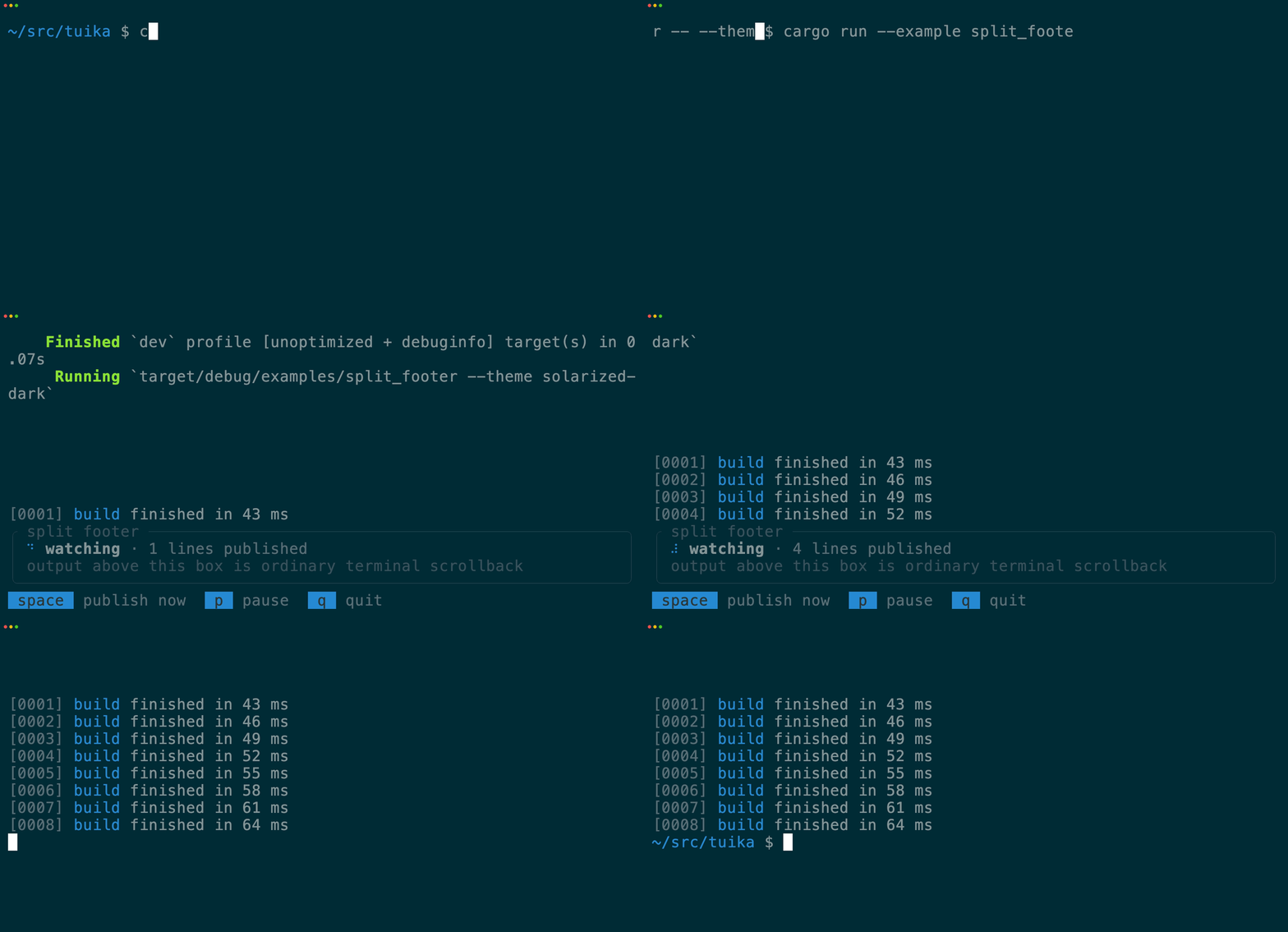
Because the footer owns the cursor, a host publishes through tuika instead of
`println!`: `Scrollback` is a cloneable, `Send + Sync` queue for background
producers, and `screen::publish_block` commits a view straight from a host's own
render loop. Either way a block is rendered once and handed over — it is the
terminal's content afterwards, not a frame tuika will repaint.
```rust
use tuika::prelude::*;
let runner = Runner::new(RunnerConfig {
tick_rate: Duration::from_millis(80),
screen_mode: ScreenMode::split_footer(5),
});
let scrollback = runner.scrollback();
scrollback.write(|_width| element(Text::raw("build finished in 12 ms")));
```
Run it with `cargo run --example split_footer`, or see a whole coding-agent UI
in the mode with `cargo run --example codex -- --split-footer`.
## Hyperlinks (OSC 8)
Turn a bare `http(s)` URL — or a markdown `[label](url)` whose visible text is
not the URL — into a real clickable link, without changing the visible text. A
cell buffer can't carry a link target — a `ratatui::Cell` is one grapheme plus a
style — so tuika emits the link by writing the OSC 8 sequence around the run
(via [`HyperlinkBackend`] scanning arbitrary rendered output, or
[`apply_buffer_links`] for destinations retained by `Paragraph` and the
markdown renderer).
[API](https://docs.rs/tuika/latest/tuika/term/hyperlink/index.html)
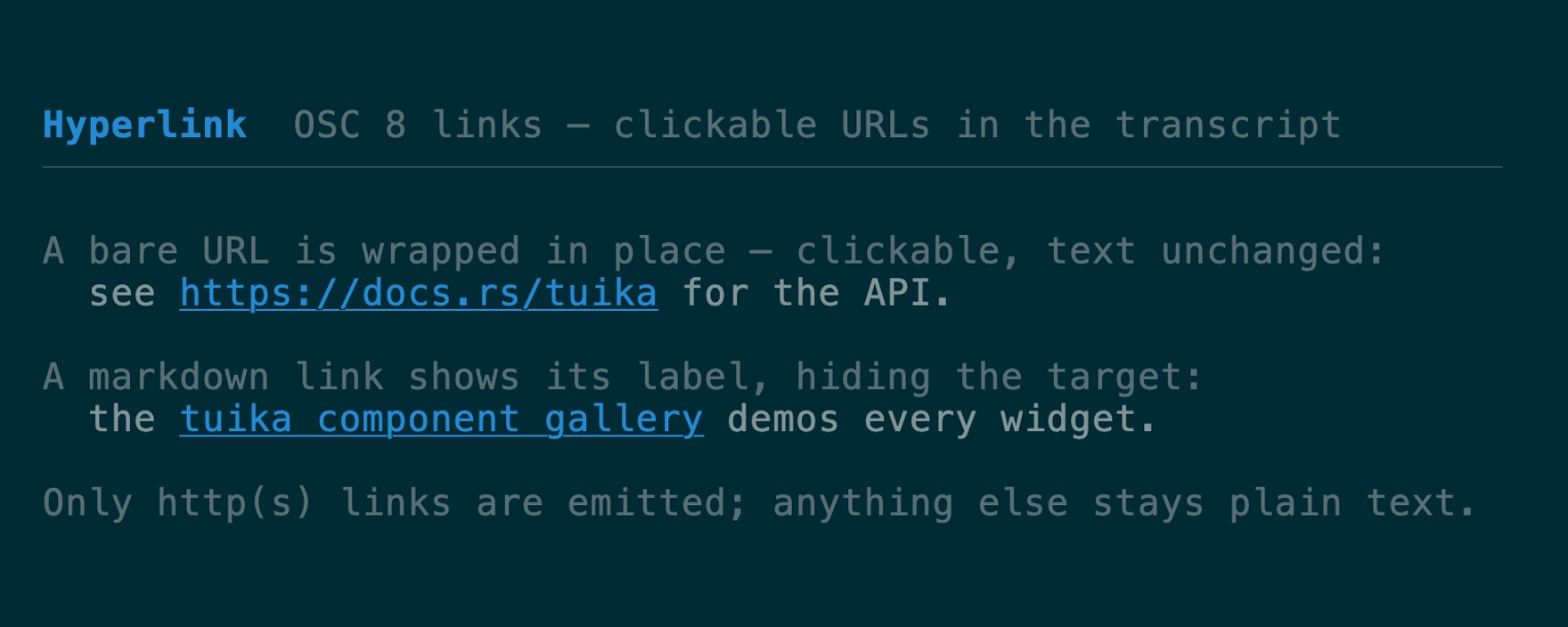 The entry points cover both components and lower-level output:
- `Paragraph` — wrapped plain prose links bare web URLs by default, including
URLs split across rows. Configure it with `Paragraph::link_policy`; `Text`,
`Wrap`, `CodeBlock`, and `Console` stay literal.
- `hyperlink::encode(url, text)` — the pure encoder. Returns `text` wrapped in the OSC 8
sequence, or `text` unchanged when `url` isn't a safe web URL. No I/O.
- `write_line(out, line)` — serialize a `ratatui::Line` (colors, modifiers, and
OSC 8 links) straight to a writer, so a host can push a transcript line to
scrollback with live links instead of routing it through the cell buffer.
- `HyperlinkBackend` — a `ratatui::Backend` wrapper that scans drawn cell runs
for URLs and wraps just those in OSC 8, so links work inside the normal render
path too. When disabled it's a zero-cost pass-through.
- `markdown::to_linked_lines` + `apply_buffer_links` — the markdown renderer
preserves `[label](url)` destinations as [`BufferLink`]s through wrapping;
after painting the lines, `apply_buffer_links` embeds OSC 8 into the boundary
cells (ForcedWidth) so a label that is not itself a URL stays clickable with
the terminal's native modifier. `Paragraph` uses the same buffer-link path
for bare URLs. Configure schemes with `LinkPolicy`, `Markdown::link_policy`,
or `Paragraph::link_policy`.
The three lower-level emitters have policy-aware forms — `encode_with`,
`write_line_with`, and `HyperlinkBackend::with_policy` — taking a `LinkPolicy`
so the host chooses which schemes are linked. The default (`LinkPolicy::WEB`) is `http(s)`-only;
`LinkPolicy::WEB.with_mailto()` also links `mailto:` addresses.
`LinkPolicy::NONE` skips emission entirely.
OSC 8 activation belongs to the terminal emulator, and tuika leaves mouse
handling native by default in both screen modes. This is required for terminal
modifier-click activation: enabling mouse capture routes mouse events to the
application instead, disabling the emulator's native link activation,
selection, and scrolling. A host should opt into capture only when it needs
application pointer/wheel events. Full-screen hosts that capture pointer motion can use
`write_pointer_shape(..., PointerShape::Pointer)` on link hover; it emits OSC 22
and should be paired with `PointerShape::Default` on hover exit and shutdown.
```rust
use tuika::term::hyperlink::{encode, is_web_url};
// Pure encoder — safe to unit-test, no terminal needed.
let link = encode("https://docs.rs/tuika", "the tuika docs");
// A bare URL a host would style and hand to `write_line` as a link run.
assert!(is_web_url("https://docs.rs/tuika"));
```
The emitted bytes (`ST` is the string terminator `ESC \`):
```text
ESC ] 8 ; ; https://docs.rs/tuika ST the tuika docs ESC ] 8 ; ; ST
```
**Supported terminals:** Ghostty, iTerm2, WezTerm, Kitty, recent VTE-based
terminals. Others render the visible text unchanged.
**Limits & safety.** The scheme allowlist is the safety boundary: by default
only `http://` and `https://` are accepted, and a host that opts into `mailto:`
gets it sanitized separately — the query (`?cc=`, `?body=`, …) is dropped so a
click can't be steered into pre-filled headers. Every accepted target has its
control characters stripped (including the `ESC`/`BEL` that could break out of
the sequence), so a crafted URL can't escape the OSC. Under tmux, passthrough
must be enabled: `set -g allow-passthrough on`.
## Mouse: selection, highlight & clicks
Tuika leaves mouse handling to the terminal by default, preserving native OSC 8
activation, selection, and scrolling. Capture is explicit through
`ScreenMode::with_mouse_capture`, `MouseCapture::Enabled`, or
`AltScreen::enter_with_mouse_capture`.
Once an app opts into capture, the terminal stops handling links and selection.
`Runner` and `AsyncRunner` restore selection over the final cell
frame: a plain left drag highlights text, a same-cell double click selects a
word, and releasing copies through OSC 52. Selection is *per panel* — a drag
that starts inside a bordered `Boxed` stays inside it, wrapping at that panel's
edges rather than streaming across the panes beside it, so copying a sidebar
entry never drags in the editor next to it. Wheel events continue to reach the
application. Return
`UpdateResult::Consumed` for a handled gesture that needs no repaint, or
`UpdateResult::Dirty` for one that does; either result keeps draggable controls
from also becoming a text selection. `with_text_selection(false)` disables the
runner default.
The `mouse` module exposes the same primitives for hosts with their own loop —
selection, copy, and hit-testing — from tuika's enriched event model
(`MouseKind` carries `Down`/`Up`/`Drag`, `Moved`, and scroll, with
`shift`/`ctrl`/`alt`).
[API](https://docs.rs/tuika/latest/tuika/mouse/index.html)
The entry points cover both components and lower-level output:
- `Paragraph` — wrapped plain prose links bare web URLs by default, including
URLs split across rows. Configure it with `Paragraph::link_policy`; `Text`,
`Wrap`, `CodeBlock`, and `Console` stay literal.
- `hyperlink::encode(url, text)` — the pure encoder. Returns `text` wrapped in the OSC 8
sequence, or `text` unchanged when `url` isn't a safe web URL. No I/O.
- `write_line(out, line)` — serialize a `ratatui::Line` (colors, modifiers, and
OSC 8 links) straight to a writer, so a host can push a transcript line to
scrollback with live links instead of routing it through the cell buffer.
- `HyperlinkBackend` — a `ratatui::Backend` wrapper that scans drawn cell runs
for URLs and wraps just those in OSC 8, so links work inside the normal render
path too. When disabled it's a zero-cost pass-through.
- `markdown::to_linked_lines` + `apply_buffer_links` — the markdown renderer
preserves `[label](url)` destinations as [`BufferLink`]s through wrapping;
after painting the lines, `apply_buffer_links` embeds OSC 8 into the boundary
cells (ForcedWidth) so a label that is not itself a URL stays clickable with
the terminal's native modifier. `Paragraph` uses the same buffer-link path
for bare URLs. Configure schemes with `LinkPolicy`, `Markdown::link_policy`,
or `Paragraph::link_policy`.
The three lower-level emitters have policy-aware forms — `encode_with`,
`write_line_with`, and `HyperlinkBackend::with_policy` — taking a `LinkPolicy`
so the host chooses which schemes are linked. The default (`LinkPolicy::WEB`) is `http(s)`-only;
`LinkPolicy::WEB.with_mailto()` also links `mailto:` addresses.
`LinkPolicy::NONE` skips emission entirely.
OSC 8 activation belongs to the terminal emulator, and tuika leaves mouse
handling native by default in both screen modes. This is required for terminal
modifier-click activation: enabling mouse capture routes mouse events to the
application instead, disabling the emulator's native link activation,
selection, and scrolling. A host should opt into capture only when it needs
application pointer/wheel events. Full-screen hosts that capture pointer motion can use
`write_pointer_shape(..., PointerShape::Pointer)` on link hover; it emits OSC 22
and should be paired with `PointerShape::Default` on hover exit and shutdown.
```rust
use tuika::term::hyperlink::{encode, is_web_url};
// Pure encoder — safe to unit-test, no terminal needed.
let link = encode("https://docs.rs/tuika", "the tuika docs");
// A bare URL a host would style and hand to `write_line` as a link run.
assert!(is_web_url("https://docs.rs/tuika"));
```
The emitted bytes (`ST` is the string terminator `ESC \`):
```text
ESC ] 8 ; ; https://docs.rs/tuika ST the tuika docs ESC ] 8 ; ; ST
```
**Supported terminals:** Ghostty, iTerm2, WezTerm, Kitty, recent VTE-based
terminals. Others render the visible text unchanged.
**Limits & safety.** The scheme allowlist is the safety boundary: by default
only `http://` and `https://` are accepted, and a host that opts into `mailto:`
gets it sanitized separately — the query (`?cc=`, `?body=`, …) is dropped so a
click can't be steered into pre-filled headers. Every accepted target has its
control characters stripped (including the `ESC`/`BEL` that could break out of
the sequence), so a crafted URL can't escape the OSC. Under tmux, passthrough
must be enabled: `set -g allow-passthrough on`.
## Mouse: selection, highlight & clicks
Tuika leaves mouse handling to the terminal by default, preserving native OSC 8
activation, selection, and scrolling. Capture is explicit through
`ScreenMode::with_mouse_capture`, `MouseCapture::Enabled`, or
`AltScreen::enter_with_mouse_capture`.
Once an app opts into capture, the terminal stops handling links and selection.
`Runner` and `AsyncRunner` restore selection over the final cell
frame: a plain left drag highlights text, a same-cell double click selects a
word, and releasing copies through OSC 52. Selection is *per panel* — a drag
that starts inside a bordered `Boxed` stays inside it, wrapping at that panel's
edges rather than streaming across the panes beside it, so copying a sidebar
entry never drags in the editor next to it. Wheel events continue to reach the
application. Return
`UpdateResult::Consumed` for a handled gesture that needs no repaint, or
`UpdateResult::Dirty` for one that does; either result keeps draggable controls
from also becoming a text selection. `with_text_selection(false)` disables the
runner default.
The `mouse` module exposes the same primitives for hosts with their own loop —
selection, copy, and hit-testing — from tuika's enriched event model
(`MouseKind` carries `Down`/`Up`/`Drag`, `Moved`, and scroll, with
`shift`/`ctrl`/`alt`).
[API](https://docs.rs/tuika/latest/tuika/mouse/index.html)
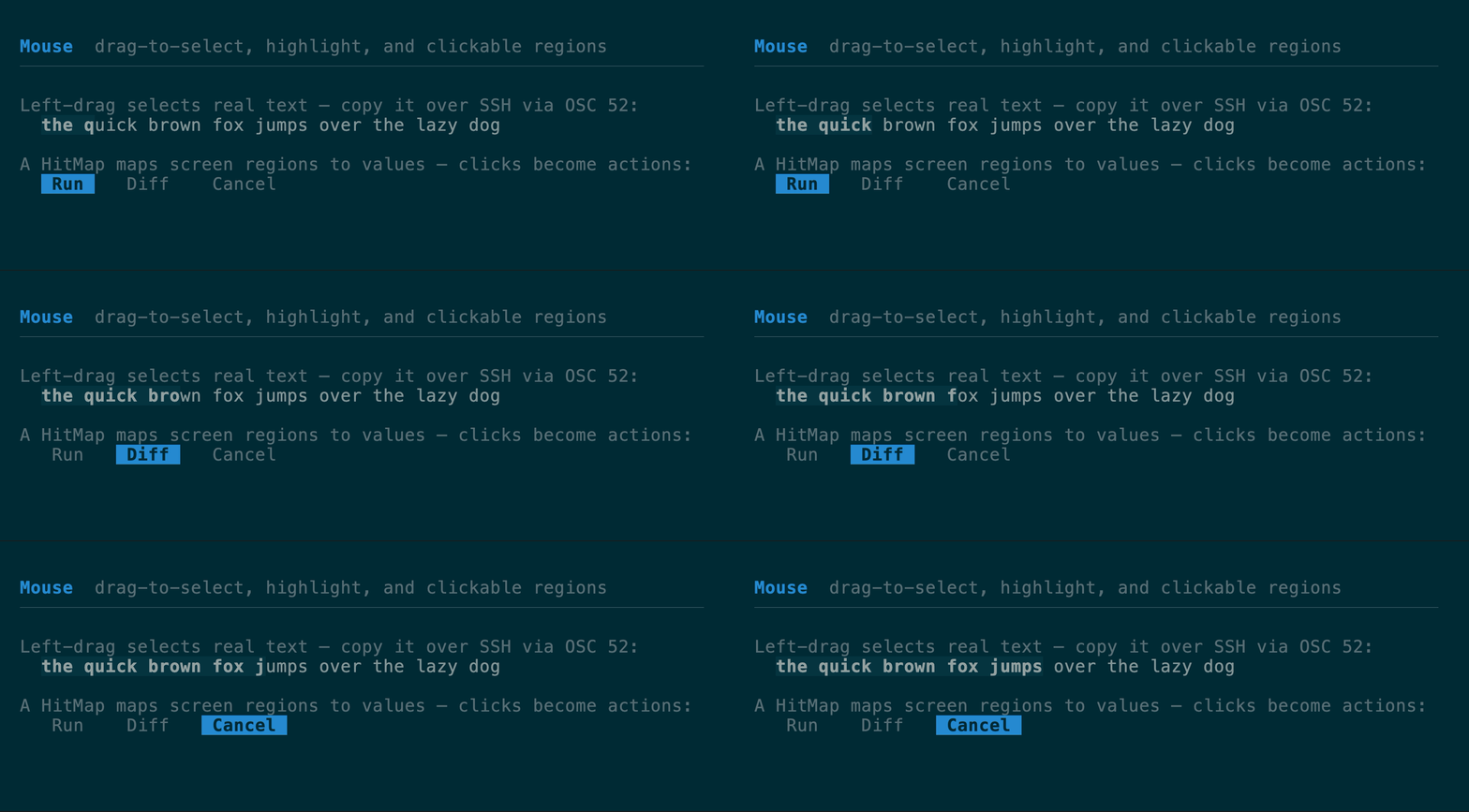 - `SelectionState` turns a left-button `Down → Drag → Up` gesture into a
`SelectionRange`, and a same-cell double click selects the word under the
pointer. Call `resolve(buffer, area)` after rendering to resolve pending word
boundaries; `selected_text(buffer, area, range)` then reads the selected text
back out of the rendered buffer (wide glyphs intact) and `mouse::paint_selection(buffer,
area, range, style)` paints it in. `handle_with_clock` accepts a host `Clock`
for deterministic gesture timing; `handle` uses `SystemClock`. `confine(Some(rect))`
restricts a gesture to one panel — positions clamp into the rect, and `region()`
reports it back so `resolve`, `selected_text`, and `paint_selection` can be
given the same bounds as their `area`.
- `ctrl_click_url(event, buffer, area)` is an application-side fallback for a
host that opted into capture. It returns the URL under a Ctrl+left-button
release: first an OSC 8 target embedded in the cell run (labeled markdown
links after `apply_buffer_links`), then a visible bare `http(s)://` run. The
host remains responsible for opening it. Because capture disables terminal
link activation and selection, prefer native OSC 8 unless the application
genuinely needs mouse events.
- `HitMap` maps screen rects to values (a button, a link, a row); the
last-pushed match wins, so children and overlays registered after their
parents take precedence. `ClickTracker` turns a same-cell `Down`/`Up` into a
`Click` and lets an intervening drag cancel it.
```rust
use tuika::mouse::{SelectionState, selected_text};
let mut sel = SelectionState::new(); // held by the host across frames
sel.handle(&mouse); // feed each mouse event
if let Some(range) = sel.range() {
let text = selected_text(&buffer, area, range);
// …copy `text` to the clipboard (see below)
}
```
Selection integrates with the clipboard feature below: the text a drag selects
is exactly what `clipboard::write` copies. **Shift-drag** is deliberately left to
the terminal so its native selection still works as an escape hatch.
## System clipboard (OSC 52)
Copy text to the system clipboard by writing an OSC 52 sequence — the *terminal*
does the copy, so there's no platform clipboard library and it works over SSH.
That makes it the natural partner to a mouse selection.
[API](https://docs.rs/tuika/latest/tuika/term/clipboard/index.html)
- `osc52(text)` — pure encoder; returns the sequence, or `None` when `text` is
empty or exceeds `MAX_LEN`.
- `clipboard::write(out, text)` — encode and write in one step, returning whether
a sequence was emitted.
```rust
use tuika::term::clipboard;
let mut out = std::io::stdout();
let copied = clipboard::write(&mut out, "selected text")?; // Ok(true) when emitted
```
The emitted bytes are the base64-encoded payload, terminated by `ST` (`ESC \`):
```text
ESC ] 52 ; c ; ST
```
**Supported terminals:** Ghostty, iTerm2 (with clipboard writes enabled),
WezTerm, Kitty, recent VTE, xterm.
**Limits.** Terminals cap the sequence near 100 000 bytes, so a single copy is
bounded at `MAX_LEN` (74 994 bytes); longer text is refused rather than sent
truncated — a truncated clipboard is worse than a failed copy. Under tmux it
needs `set -g allow-passthrough on` (or tmux's own `set-clipboard`), the same
passthrough caveat as OSC 8.
## Native progress (OSC 9;4)
Drive the terminal's *own* progress indicator — a bar across the window in
Ghostty, the taskbar in Windows Terminal and ConEmu. It's fully out-of-band: it
moves no cursor and paints no cells, so it works in both the inline and
full-screen renderers and composes with an in-grid
[`ProgressBar`](/components/motion/#progressbar).
[API](https://docs.rs/tuika/latest/tuika/term/progress/struct.TerminalProgress.html)
`TerminalProgress` owns the indicator and clears it on drop, so a dropped or
panicking session never leaves a stuck bar in the taskbar. Its methods map to
the indicator states: `percent` (normal), `error`, `indeterminate`, and
`clear`.
```rust
use tuika::term::progress::TerminalProgress;
let mut progress = TerminalProgress::new();
progress.percent(60); // 60% on the terminal's own bar
// progress.indeterminate(); // busy, percent ignored
// progress.error(60); // error state at 60%
// …dropping `progress` clears the indicator.
```
The emitted bytes (`state` is 0–4, `percent` is 0–100; terminated by `BEL`):
```text
ESC ] 9 ; 4 ; ; BEL
```
**Supported terminals:** Ghostty (bar across the top of the window), Windows
Terminal and ConEmu (taskbar), WezTerm, Konsole, mintty. Others swallow the
unknown OSC. Writes are best-effort — a failed progress write never disrupts the
session.
## Images (Kitty, iTerm2 & Sixel graphics protocols)
Paint real pixels — an avatar, a chart, a rendered diagram — over the cells a
view reserves for them, using the **Kitty**, **iTerm2**, or **Sixel** graphics
protocol, whichever the terminal speaks.
[API](https://docs.rs/tuika/latest/tuika/term/image/index.html)
- `SelectionState` turns a left-button `Down → Drag → Up` gesture into a
`SelectionRange`, and a same-cell double click selects the word under the
pointer. Call `resolve(buffer, area)` after rendering to resolve pending word
boundaries; `selected_text(buffer, area, range)` then reads the selected text
back out of the rendered buffer (wide glyphs intact) and `mouse::paint_selection(buffer,
area, range, style)` paints it in. `handle_with_clock` accepts a host `Clock`
for deterministic gesture timing; `handle` uses `SystemClock`. `confine(Some(rect))`
restricts a gesture to one panel — positions clamp into the rect, and `region()`
reports it back so `resolve`, `selected_text`, and `paint_selection` can be
given the same bounds as their `area`.
- `ctrl_click_url(event, buffer, area)` is an application-side fallback for a
host that opted into capture. It returns the URL under a Ctrl+left-button
release: first an OSC 8 target embedded in the cell run (labeled markdown
links after `apply_buffer_links`), then a visible bare `http(s)://` run. The
host remains responsible for opening it. Because capture disables terminal
link activation and selection, prefer native OSC 8 unless the application
genuinely needs mouse events.
- `HitMap` maps screen rects to values (a button, a link, a row); the
last-pushed match wins, so children and overlays registered after their
parents take precedence. `ClickTracker` turns a same-cell `Down`/`Up` into a
`Click` and lets an intervening drag cancel it.
```rust
use tuika::mouse::{SelectionState, selected_text};
let mut sel = SelectionState::new(); // held by the host across frames
sel.handle(&mouse); // feed each mouse event
if let Some(range) = sel.range() {
let text = selected_text(&buffer, area, range);
// …copy `text` to the clipboard (see below)
}
```
Selection integrates with the clipboard feature below: the text a drag selects
is exactly what `clipboard::write` copies. **Shift-drag** is deliberately left to
the terminal so its native selection still works as an escape hatch.
## System clipboard (OSC 52)
Copy text to the system clipboard by writing an OSC 52 sequence — the *terminal*
does the copy, so there's no platform clipboard library and it works over SSH.
That makes it the natural partner to a mouse selection.
[API](https://docs.rs/tuika/latest/tuika/term/clipboard/index.html)
- `osc52(text)` — pure encoder; returns the sequence, or `None` when `text` is
empty or exceeds `MAX_LEN`.
- `clipboard::write(out, text)` — encode and write in one step, returning whether
a sequence was emitted.
```rust
use tuika::term::clipboard;
let mut out = std::io::stdout();
let copied = clipboard::write(&mut out, "selected text")?; // Ok(true) when emitted
```
The emitted bytes are the base64-encoded payload, terminated by `ST` (`ESC \`):
```text
ESC ] 52 ; c ; ST
```
**Supported terminals:** Ghostty, iTerm2 (with clipboard writes enabled),
WezTerm, Kitty, recent VTE, xterm.
**Limits.** Terminals cap the sequence near 100 000 bytes, so a single copy is
bounded at `MAX_LEN` (74 994 bytes); longer text is refused rather than sent
truncated — a truncated clipboard is worse than a failed copy. Under tmux it
needs `set -g allow-passthrough on` (or tmux's own `set-clipboard`), the same
passthrough caveat as OSC 8.
## Native progress (OSC 9;4)
Drive the terminal's *own* progress indicator — a bar across the window in
Ghostty, the taskbar in Windows Terminal and ConEmu. It's fully out-of-band: it
moves no cursor and paints no cells, so it works in both the inline and
full-screen renderers and composes with an in-grid
[`ProgressBar`](/components/motion/#progressbar).
[API](https://docs.rs/tuika/latest/tuika/term/progress/struct.TerminalProgress.html)
`TerminalProgress` owns the indicator and clears it on drop, so a dropped or
panicking session never leaves a stuck bar in the taskbar. Its methods map to
the indicator states: `percent` (normal), `error`, `indeterminate`, and
`clear`.
```rust
use tuika::term::progress::TerminalProgress;
let mut progress = TerminalProgress::new();
progress.percent(60); // 60% on the terminal's own bar
// progress.indeterminate(); // busy, percent ignored
// progress.error(60); // error state at 60%
// …dropping `progress` clears the indicator.
```
The emitted bytes (`state` is 0–4, `percent` is 0–100; terminated by `BEL`):
```text
ESC ] 9 ; 4 ; ; BEL
```
**Supported terminals:** Ghostty (bar across the top of the window), Windows
Terminal and ConEmu (taskbar), WezTerm, Konsole, mintty. Others swallow the
unknown OSC. Writes are best-effort — a failed progress write never disrupts the
session.
## Images (Kitty, iTerm2 & Sixel graphics protocols)
Paint real pixels — an avatar, a chart, a rendered diagram — over the cells a
view reserves for them, using the **Kitty**, **iTerm2**, or **Sixel** graphics
protocol, whichever the terminal speaks.
[API](https://docs.rs/tuika/latest/tuika/term/image/index.html)
![Image demo, side by side: on a Kitty/Ghostty/WezTerm/Konsole terminal the Image view renders a red/green gradient in place; on every other terminal the same view shows a dimmed italic '[image: a red/green gradient]' placeholder.](/docs-assets/demos/image.svg) Unlike the other demos, this one is generated from the real render rather than
recorded — VHS captures through xterm.js, which doesn't implement the Kitty
graphics protocol, so it can't show the pixels. The picture above is the actual
RGBA the component transmits; the fallback panel is the exact placeholder string
it paints.
Images are the one out-of-band feature that does **not** degrade harmlessly on
its own: a terminal that can't read the graphics escape may paint the payload as
garbage rather than swallowing it. So this is the only feature gated on real
capability detection — `ImageSupport::detect()` reads the environment (`TERM`,
`TERM_PROGRAM`, `KITTY_WINDOW_ID`, the Ghostty marker) and defaults to *no*
graphics, where the same `Image` view falls back to an alt-text placeholder.
Decoding stays in the host (it's a heavy dependency, kept out of tuika like
syntax highlighting is): a host hands in raw RGBA via `ImageData::from_rgba`,
and tuika encodes it for whichever protocol the terminal wants — raw RGBA for
Kitty, an in-tuika PNG for iTerm2 — with no image-codec dependency. Because a
graphics escape paints at the cursor — unlike the cursor-neutral OSC sequences
above — `Runner` owns a two-step draw:
- `Image` reserves a `cols × rows` cell footprint and, on render, records its
placement into a shared `ImageLayer` (the ownership shape of `RectProbe`).
- **After** `terminal.draw()` flushes the frame, the runner writes
each image's escape at its cell origin, bracketed by a cursor save/restore so
ratatui's cursor model is undisturbed, then resets the layer for the next
frame.
```rust
use tuika::prelude::*;
use tuika::term::image::ImageData;
let data = ImageData::from_rgba(2, 2, vec![0u8; 2 * 2 * 4]).unwrap();
let _image = Image::new(data, 20, 10) // 20×10 cells on screen
.alt("a 2×2 swatch"); // shown where graphics aren't supported
```
Custom hosts keep the explicit boundary: install `ImageSupport` and an `ImageLayer`
with `RenderCtx::with_image_graphics`, call `paint_with_context`, then emit and
clear the layer after flushing the cell frame.
The emitted bytes per protocol (base64 payload; `ST` is `ESC \`, `BEL` is
`0x07`). Kitty carries raw RGBA (`f=32`), chunked, with `q=2` suppressing the
terminal's replies so they aren't read as input:
```text
ESC _ G f=32,s=,v=,a=T,c=,r=,q=2,m= ; ST
```
iTerm2 carries a PNG file sized in cells:
```text
ESC ] 1337 ; File=inline=1;width=;height=;preserveAspectRatio=0;size= : BEL
```
Sixel carries a palette-quantized bitmap (it has no cell-based sizing, so tuika
resamples the pixels to an assumed cell geometry first):
```text
ESC P q "1;1;; ESC \
```
**Supported terminals:** Kitty, Ghostty, WezTerm, Konsole (Kitty protocol);
iTerm2 (its own protocol); foot, xterm +sixel, mlterm, contour (Sixel). Others
show the alt-text fallback. Sixel has no reliable environment signal, so a host
on a Sixel terminal usually sets `ImageSupport::Sixel` explicitly. See the
`image` example (`cargo run --example image`).
Markdown `` renders too, in both the one-shot `Markdown` view and the
streaming `MarkdownState`. A host `ImageResolver` decodes each URL to `ImageData`
(markdown carries only the URL, never pixels, exactly like the code `Highlighter`
boundary); a resolved image reserves a block and is painted with the same `Image`
machinery — real pixels where supported, alt text otherwise. The view's
`.images(resolver, support, layer)` overlays them for you; a host driving
`MarkdownState::lines` reads `MarkdownState::images()` and paints each
`MarkdownImage` at its `rect(area)`. Unresolved images stay a marked, link-styled
inline placeholder rather than dropping the URL.
## See also
- [Component gallery](/components/) — the widgets that paint the grid.
- [Markdown guide](/markdown/) — where hyperlinks and images meet rendered
markdown.
- [API documentation](https://docs.rs/tuika) — the complete reference for the
`capabilities`, `hyperlink`, `mouse`, `clipboard`, `native`, and `image`
modules.
- [Runnable examples](https://github.com/everruns/tuika/tree/main/examples/) — `mouse` records the selection/clipboard
workflow live; quit with `q`/`esc`.
- [README](https://github.com/everruns/tuika/blob/main/README.md) — the model behind the toolkit.
Source: https://tuika.dev/features/index.mdx
Unlike the other demos, this one is generated from the real render rather than
recorded — VHS captures through xterm.js, which doesn't implement the Kitty
graphics protocol, so it can't show the pixels. The picture above is the actual
RGBA the component transmits; the fallback panel is the exact placeholder string
it paints.
Images are the one out-of-band feature that does **not** degrade harmlessly on
its own: a terminal that can't read the graphics escape may paint the payload as
garbage rather than swallowing it. So this is the only feature gated on real
capability detection — `ImageSupport::detect()` reads the environment (`TERM`,
`TERM_PROGRAM`, `KITTY_WINDOW_ID`, the Ghostty marker) and defaults to *no*
graphics, where the same `Image` view falls back to an alt-text placeholder.
Decoding stays in the host (it's a heavy dependency, kept out of tuika like
syntax highlighting is): a host hands in raw RGBA via `ImageData::from_rgba`,
and tuika encodes it for whichever protocol the terminal wants — raw RGBA for
Kitty, an in-tuika PNG for iTerm2 — with no image-codec dependency. Because a
graphics escape paints at the cursor — unlike the cursor-neutral OSC sequences
above — `Runner` owns a two-step draw:
- `Image` reserves a `cols × rows` cell footprint and, on render, records its
placement into a shared `ImageLayer` (the ownership shape of `RectProbe`).
- **After** `terminal.draw()` flushes the frame, the runner writes
each image's escape at its cell origin, bracketed by a cursor save/restore so
ratatui's cursor model is undisturbed, then resets the layer for the next
frame.
```rust
use tuika::prelude::*;
use tuika::term::image::ImageData;
let data = ImageData::from_rgba(2, 2, vec![0u8; 2 * 2 * 4]).unwrap();
let _image = Image::new(data, 20, 10) // 20×10 cells on screen
.alt("a 2×2 swatch"); // shown where graphics aren't supported
```
Custom hosts keep the explicit boundary: install `ImageSupport` and an `ImageLayer`
with `RenderCtx::with_image_graphics`, call `paint_with_context`, then emit and
clear the layer after flushing the cell frame.
The emitted bytes per protocol (base64 payload; `ST` is `ESC \`, `BEL` is
`0x07`). Kitty carries raw RGBA (`f=32`), chunked, with `q=2` suppressing the
terminal's replies so they aren't read as input:
```text
ESC _ G f=32,s=,v=,a=T,c=,r=,q=2,m= ; ST
```
iTerm2 carries a PNG file sized in cells:
```text
ESC ] 1337 ; File=inline=1;width=;height=;preserveAspectRatio=0;size= : BEL
```
Sixel carries a palette-quantized bitmap (it has no cell-based sizing, so tuika
resamples the pixels to an assumed cell geometry first):
```text
ESC P q "1;1;; ESC \
```
**Supported terminals:** Kitty, Ghostty, WezTerm, Konsole (Kitty protocol);
iTerm2 (its own protocol); foot, xterm +sixel, mlterm, contour (Sixel). Others
show the alt-text fallback. Sixel has no reliable environment signal, so a host
on a Sixel terminal usually sets `ImageSupport::Sixel` explicitly. See the
`image` example (`cargo run --example image`).
Markdown `` renders too, in both the one-shot `Markdown` view and the
streaming `MarkdownState`. A host `ImageResolver` decodes each URL to `ImageData`
(markdown carries only the URL, never pixels, exactly like the code `Highlighter`
boundary); a resolved image reserves a block and is painted with the same `Image`
machinery — real pixels where supported, alt text otherwise. The view's
`.images(resolver, support, layer)` overlays them for you; a host driving
`MarkdownState::lines` reads `MarkdownState::images()` and paints each
`MarkdownImage` at its `rect(area)`. Unresolved images stay a marked, link-styled
inline placeholder rather than dropping the URL.
## See also
- [Component gallery](/components/) — the widgets that paint the grid.
- [Markdown guide](/markdown/) — where hyperlinks and images meet rendered
markdown.
- [API documentation](https://docs.rs/tuika) — the complete reference for the
`capabilities`, `hyperlink`, `mouse`, `clipboard`, `native`, and `image`
modules.
- [Runnable examples](https://github.com/everruns/tuika/tree/main/examples/) — `mouse` records the selection/clipboard
workflow live; quit with `q`/`esc`.
- [README](https://github.com/everruns/tuika/blob/main/README.md) — the model behind the toolkit.
Source: https://tuika.dev/features/index.mdx